A while ago, back in Healthcare IT we had just finished moving all of our Workstations to a new Internet Proxy solution, ZScaler.
Everything was working perfectly, but then a DC alert for a hardware failure on our old proxy appliance came through, and it caused a bit of a panic.

Somebody asked the obvious question:
What’s still using this old appliance?
Our head of IT answered: all 500 of our servers.
How I got pulled into this.
The Ops manager came up to me and asked for a “quick chat”.
Chris, what’s you workload like at the moment?
Uhh, I’ve got a few things going on but I can make room if you need me.
I’ve got a bit of a project you might be interested in, and I think you’re a good fit for it.
oh, what’s it about?
Basically, we need to migrate all our servers from our on-prem proxy appliance over to ZScaler.
We’ll set up some meetings with the Web Security team, projects and IT leadership to help you get started.
I reckon this will be a good challenge for you.
Sounds good! I’ll start looking into this and get an idea of what’s involved.
The Timeline
I knew this was not going to be a simple task.
We had about 500 different servers that were in scope for this migration, mostly Server 2008 and 2012 VM’s with a ton of proprietary medical applications running on them.
There was a lot of pressure to get this right, to minimize clinical impact and do things properly.
I’d been in this role/team for a year, and while it was technically a Level 2 team it was still my first IT role, so I wouldn’t have expected to be able to do project work like this, especially so soon.
Still, I was feeling confident, and figured if nothing else, it would be a good learning experience and a chance to get recognised.
Where do I even start.
There was no existing plan. No documentation.
Nobody had done this before in the company, I was on my own.
I built an Asana page to track my work and set some tasks to get me started.
- How is the current proxy configured?
- Where are those settings coming from?
- What actually needs internet access?
- What’s been allowed historically? (and does it still make sense)
Introductions
We had an intro session with all the key teams, infrastructure management, web security, and other leadership.
These are the people that will work with you to get this over the line, get to know them and reach out if you need anything.
I asked for some access to Zscaler and the existing proxy appliance so I could actually see what I was working with.
We manage those systems, we can’t give you access.
Fair enough.
But we can give you proxy logs via Splunk.
Not ideal, but better than nothing.
At that point, it became clear my role wasn’t just technical.
I was here to:
- Coordinate multiple teams
- Audit the environment and analyse logs/data
- Design the approach and implementation
- Obtain approvals through Cyber/GRC
- Report progress weekly to leadership
Somewhere along the way, I’d effectively become a project manager, I was running everything, assigning work to other resources and planning overtime work for the whole team.
How were things setup at the moment?
Well, it wasn’t great.
We had an old Bluecoat proxy appliance which was:
- Long out of support
- Running on failing hardware
- Somehow still critical to everything

Every server pointed to this appliance but used:
- Various different DNS aliases
- Sometimes direct IPs
- Hardcoded settings within all of our medical apps
The main source of these settings came from GPO’s, which would set the user proxy globally, and override any changes.
That wasn’t it however, there were some apps that pulled down their own central configs from Network shares or control servers that needed to be updated.
The company policy also required that admin accounts never have Internet Access, authentication was setup via SSO to restrict this on Bluecoat, so a solution would have to be found for ZScaler too.
Server types
Our clinic servers were basically in one of 3 categories, we had ~150 of each of the below, all onsite at the clinic:
Most clinics had three main server types:
- VMREMOTE – jump box for remote users, plus file/print.
- VMDB – database server, highly restricted.
- VMAPP – application server running a mix of medical software
We also had plenty of legacy VMs still used for accessing old databases that and all our Hypervisors to look into.
Testing Begins
The first thing I needed to do was to get control of the GPO that was setting the user proxy, and discuss with the app support team about all the medical apps and their settings.
I spoke to our server guys, and got an exclusion group setup, this allowed me to start testing and documenting what needed fixes.
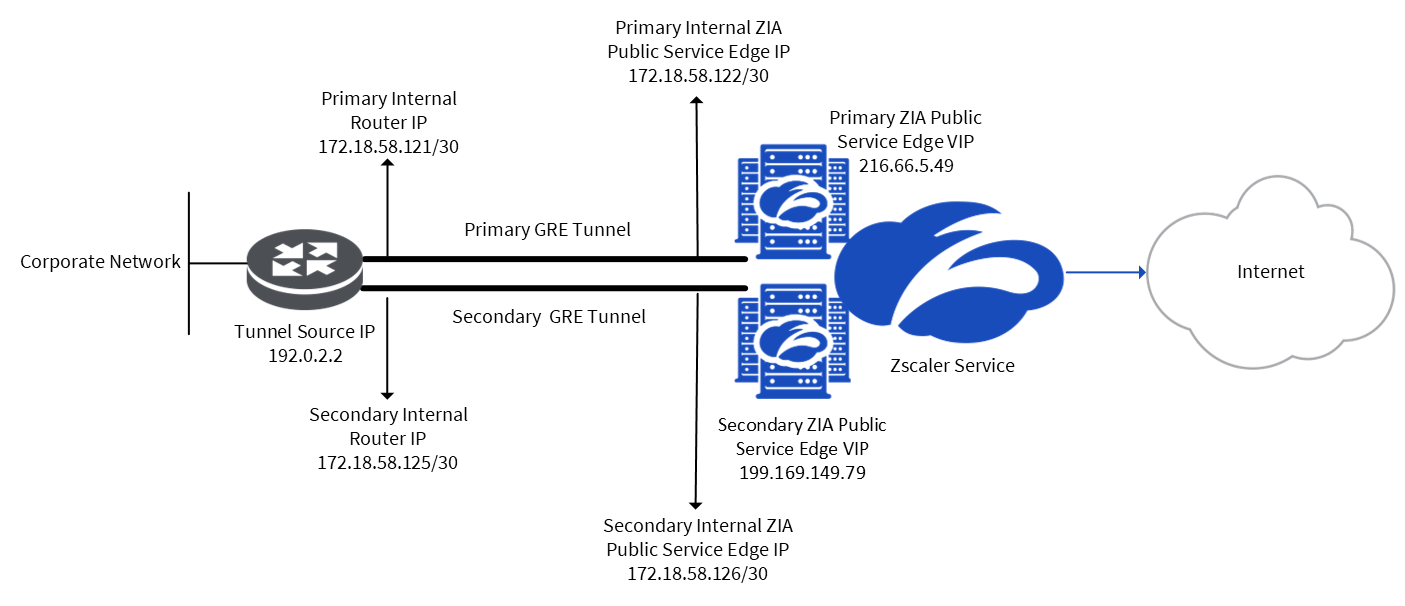
Our ZScaler setup looked a bit like this, so all I needed to do was clear the proxy configuration from each server and it would then effectively be using ZScaler.
I spun up a test clinic in the IT office, but quickly realised that the ZScaler “whitelist” needed a lot of work.
VMREMOTE servers couldn’t even browse the internet, which meant doctors working from home would be completely lost.
Our users use VMREMOTE the same way they use their workstations, so the Internet Access on them needed to align with desktops, I knew this would be a battle for approval.
For the other servers, I pulled a month of proxy logs from Splunk and started filtering traffic by server group.
The goal was simple:
- Identify destinations.
- Map destinations to applications/services.
- Justify why they should be allowed.
I’d end up with a report that looked something like this, and from there I would comb through each entry, figure out what app/service it links to and then find a way to justify it being allowed.
There were a lot of funny ones, I remember we had requests going to icanhazip which didn’t exactly look great when presenting it to Cyber, even if it’s really just a medical app doing it’s thing.
I couldn’t prove blocking it would break anything, but if/when it did I’d have to be there to fix it.
I drafted 3x long approval requests, one for each of our server types, submitted them, and let the chaos begin.
The approval meeting
After I submitted my approval request, I got sent a meeting invite to discuss the approval, but this meeting included:
- Cyber
- GRC
- IT leadership
- Executives from the parent company
There were multiple CTO’s and IT executives in here, this was a big meeting.
I presented my case, described what I’m trying to achieve and my justification for the request, one of the managers turned to the head of IT for my company (let’s call him Bob) and started going wild.
Bob, why do so many of these servers have multiple roles?!?
Is there a genuine need for workstation-level Internet access on VMREMOTE’s???
When are these boxes being upgraded to Server 2019/2022?
At some point I stopped presenting and just watched our head of IT get absolutely grilled.
Eventually, we got what we needed, conditional approval (with a lot of follow-up work attached).
New Problems
Seeing how crazy and difficult this was to get approved, I started to think about this more from an attackers perspective, I had some things come to mind.
- What web browsers are we using on these servers?
- How are we going to block admin users from Internet Access?
- What if someone downloaded an executable?
I started looking into the browser one, there was a mix of different browsers installed, I ended up chatting with IT management and the decision was “Chrome”, even though it was technically unsupported for Server 2008 at this point.

Another big problem stood out immediately when I was testing the access that was implemented.
Bluecoat blocked executable downloads, Zscaler didn’t – not without SSL inspection, which “wasn’t on our roadmap right now”.
I ended up building an AppLocker policy to block execution of anything in downloads and user folders, and a Software Restriction Policy for the old machines that didn’t support AppLocker.
Pilot time.
With approvals in place, we moved into pilot.
I picked a smaller site, cut them over after-hours, then tested everything.
There was a lot of trial and error:
- GPO changes took forever (klist purge helped here)
- Apps broke in annoying ways (throwing random errors)
- Vendors didn’t like our ZScaler IP’s (they had to whitelist us)
- Some apps were still using the old proxy (and I didn’t know how)
It turned out that some apps had proxy configs hidden in strange places that were undocumented, like random XML files.

All in all though, the key components worked, I was able to cutover the server, identify things to work on the next day, then cut it back.
Production Rollout
I was well-aware that a lot of what I was doing could have been heavily automated, but at least to start with, I wanted to be very involved and make sure that things worked the way that a user would actually do them.
For a lot of the medical apps we needed to login to the machine interactively, open the app from the tray, enter the app username and password, dismiss an update prompt, navigate to the proxy settings, clear them, ensure the app works, and monitor the logs.
There were a lot of edge cases that came up:
- We had some servers that refused to save the new proxy settings, and ended up having corrupted registry’s (fixed by importing from another server).
- There were some sneaky host file entries causing hits to the old proxy that was not actually real traffic.
- We had 2x clinics on non-SOE setups which had different software stacks or attempts to further lock down the proxy settings, which were fun to figure out.
The Prod rollout gave me an opportunity to log on to every server in the company. and I started noticing small things, like broken Windows Activation.
At one point I made a shocking discovery, an entire server fleet (50+ VM’s part of one of our business units) did not have Carbon Black installed at all (our EDR software).- Let me know in the comments if you want a post on the aftermath of this one!
All in all though, I worked through all the ZScaler cutovers after-hours, a few months in and I was done, everything was working.
Confirming my success.
Not long after finalising my rollout, I requested all our Server IP’s be blacklisted from Bluecoat.
This was a simple, reliable, easy-to-revert way to ensure that we have completely cutover our fleet and that there is nothing that we have missed outside of the logs.
That got implemented without any issues, we tested things and made sure all our apps functioned after the block.
Awesome, we’ve now finished our transition and nothing went wrong, right?
The “Cleanup” Incident
Remember that exclusion group for the GPO that I had made so that we could manage the rollout smoothly?
Well it was time for that to be retired, so I put in a ticket to the server guys asking to make the behaviour of this group the default for our OU and remove the group afterwards.
Except… they didn’t do that.
They deleted the group, didn’t implement anything to make the desired setting default, and then deleted all the policies setting the old proxy settings (or so they thought).
Turns out there was an oversight and the old policy was still applying because of loopback processing.
So our servers all started reverting back to the old proxy server, which was now blocking requests, and we had an influx of tickets come in for all sorts of issues.
Our ops manager was fuming, and I was not happy either.
Undoing this mistake took another 2 weeks, we had to actually reboot a fair few of our servers to get them back on the desired settings. Not cool.
Lessons Learned
In the end, the project went pretty well, it was honestly a good opportunity to get hands on with our environment and more involved with the business.
If I was doing this again, I would spend a lot longer working with splunk data and traffic logs, creating better reports for each of my weekly update meetings (there was a lot of good client data).
In the end though, I learned tons about Windows Networking, project management, medical applications (and how frustrating they can be to configure), and how to use monitoring tools like Splunk to get the data I want out of log dumps.
I hope you enjoyed the read!
Cheers,
Chris
Leave a Reply